TimeDX Help.
Timing.
The TimeDX millisecond timer
test displays a screen similar to this:
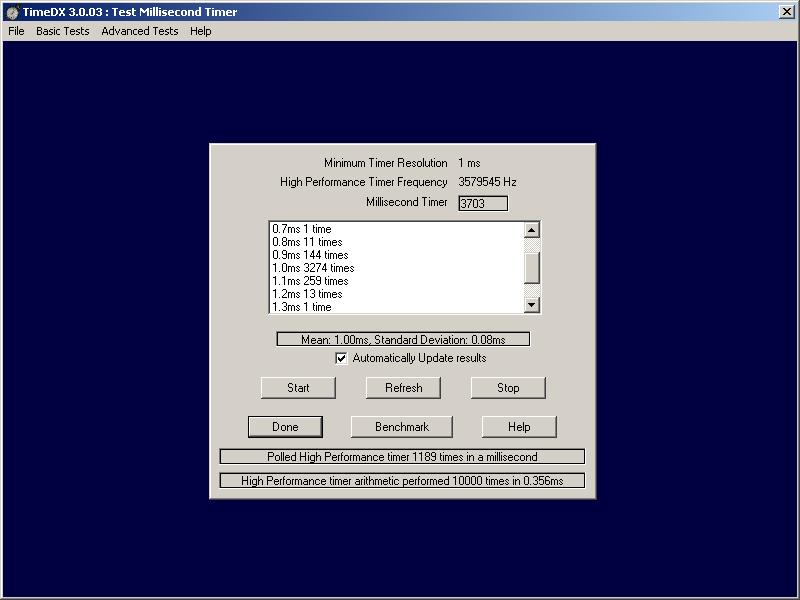
Displayed at the top of the dialog
is the minimum timer resolution in milliseconds, this is the smallest interval
that the Multi-Media Extensions report available, if this is not 1 DMDX's
performance will be sub optimal. The High Performance Counter (HPC for short)
is accurate to the displayed frequency. On modern processors it effectively yields
a microsecond timer, if you have a system that provides a high performance
timer that has a lower frequency it is possible that it's use may in fact
be worse than DMDX version 1 can obtain when not using the HPC, as I've never
seen nor heard of one I'm not going to write about it's implications.
Click Start to start the Millisecond timer verification.
Displayed next to "Millisecond Timer" is the high performance timer's converted
value in milliseconds, to verify it's accuracy you will have to use a stop
watch and run the test for a long time. If "Automatic Update" has been unchecked clicking
Refresh (which doesn't work so well if windows is smoothly animating it's
windows) or Stop will update the list box with a track record of the latencies
between millisecond callbacks, otherwise they will be updated once a second
or so. On all machines tested so far these intervals are far from exactly
1.0ms, however the OS goes to extensive lengths to make sure there are 1000
of them in a second, so for most 1.1ms intervals there will be a similar number
of 0.9ms intervals and so forth. There appear to be two classes of machines
here, the good ones that have the majority of intervals in the 0.9, 1.0 and
1.1ms bracket and standard deviations of 0.30ms or less and the not so good machines that have most latencies in the
1.9 and 0.1ms bins with SDs over 0.70ms (all very old processors you're not
likey to see these days). I have no clue as to what puts a given machine into
a given class (the "Automatic Update" checkbox was an attempt to see if updating
the results was the cause) but these days you're not likely to see a poorly
performing machine. Needless to say RTs measured
on the good machines are going to be more accurate than the ones measured
on the later machines -- see DMDX's Input section for advanced measurement of these latencies' affects.
The Advanced Video
and Millisecond Timer test gathers
this same latency data, however the DirectX video system is active then as
opposed to the windows display in this test and machines that perform relatively
poorly with this test perform better there without the windows messaging overhead.
By the time the retrace tracking thread is activated in the Vertical
Retrace Sync Thread and you turn
on the Millisecond test as well the results move back in the direction of
this test, however they are still a bit better than indicated here, patently
windows messaging involves a higher overhead.
The Benchmark button determines how much overhead reading
the HPC invokes by polling the high performance timer as many times as it
can in a millisecond. The values on all systems I have tested so far are
surprisingly low, around 200 times per millisecond, perfectly fast enough
for DMDX's purposes but we're talking about machines that execute many, many,
millions of instructions per second. Originally I thought this was largely
because the high performance timer is a double precision floating point value
(64 bit) and in order to read it as milliseconds it must be divided by a constant,
but as the second part of the benchmark shows the arithmetic is no particular
burden (typically 1/30th of the HPC read), the overhead must either be in
reading the clock itself or the call to OS.
There are two times I
have seen the millisecond timer stuff not work, in TimeDX when this happens
the list box of latencies does not update. One was when the Explorer had
been open for a long while and a CD was in my CD Drive that Explorer does
not like and it was caught in an infinite loop. Once it had been terminated
with cntrl-alt-delete the millisecond timer started working again. This is
not a weird as it sounds, the millisecond code is part of the multi-media
stuff, the CD probably has an audio track and is therefore part of that subsystem.
The other time is after TimeDX crashes and you run it again.
Hopefully by the time you get the thing you won't be able to make it die,
however the nature of the Universe being what it is someone will. Basically
if the program does one of a number of verboten things it is summarily terminated
by the operating system, which is fine, except that if the millisecond timer
callback was being used it appears to get snarled on older operating systems.
Running TimeDX until the latency list box updates will fix the problem, at
most I have need to run TimeDX twice.
NOTE: Users of laptops may need to pay closer attention to
the use of the high performance timer. A Windows 2000 timer is derived from
the RDTSC instruction available on Pentium 5 and higher CPUs, it's count is
based upon CPU clock frequency, something that normally doesn't fluctuate
-- however a laptop can switch it's CPU clock for it's low power standby,
so some care needs to be taken to make sure the laptop isn't in any a low
power state. If I had a laptop I could offer some advice, I don't so I can't.
TimeDX
Index.